
Upload an image to Free Image Vault
Updated 29 October 2026
Anyone with a free account can share their photos and AI images on Free Image Vault. It only takes a few minutes.
How to upload
- Click Submit an image at the top of any page. If you aren't signed in yet, you'll be asked to join (it's free) or log in.
- Read the short rules, tick I understand and agree and click Start uploading. You only need to do this once each visit.
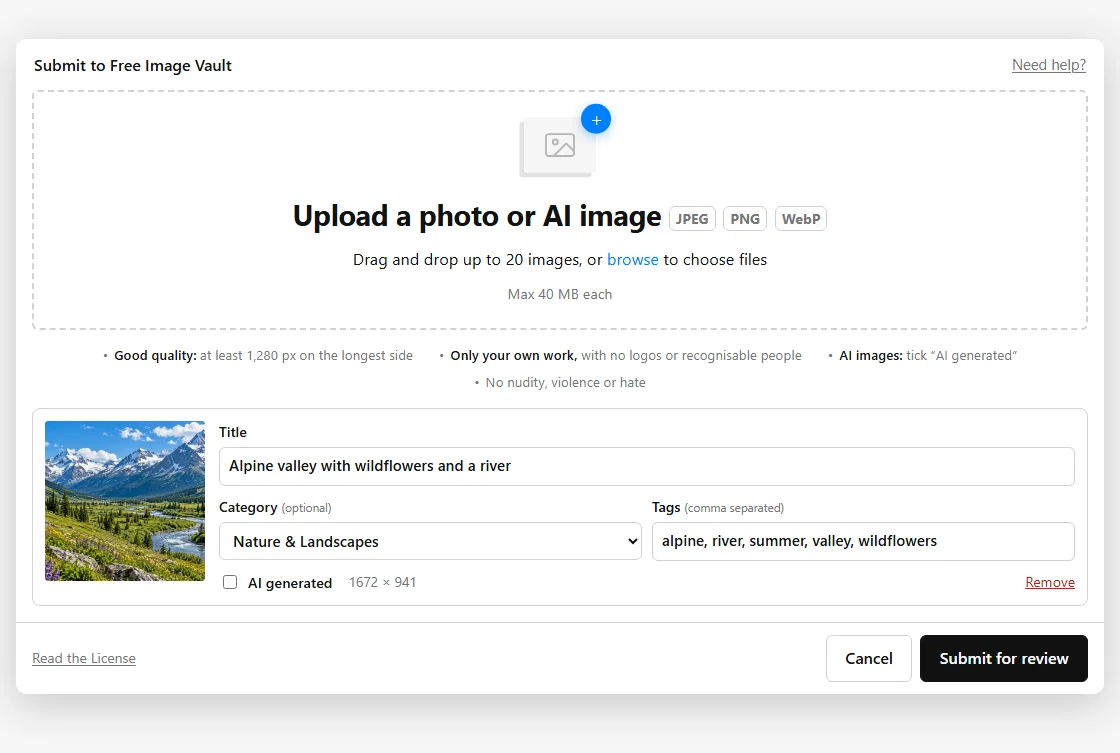
- Drag and drop up to 20 images into the box, or click browse to choose them. Each one appears in the list as soon as it has uploaded.
- Give each image a title. You can also choose a category and add tags, separated by commas. Tick AI generated on any image an AI tool made.
- Click Submit for review. That's it!
What you can upload
- JPEG, PNG or WebP files, up to 40 MB each.
- At least 1,280 pixels on the longest side.
- Only your own work. Read the submission guidelines before you start.
Tips for titles and tags
Describe what is in the picture in plain words, for example “Red tram on a rainy street in Lisbon”. For tags, add a few words people might search for: the place, the main things in the picture, the season or the mood. Good titles and tags help people find your images.
Uploads you haven't sent yet
Images you upload but don't submit stay on the upload page for 24 hours, so you can come back and finish them. After that they are deleted. To take one out before sending, click Remove next to it.
What happens next
We look at every image before it goes on the site, and email you when we have. See What happens after you submit. If something goes wrong while uploading, see Problems uploading an image.